
How to Run OpenClaw on a Private VPS Safely
Learn how to run OpenClaw on a private VPS with tighter isolation, safer key handling, and a practical hardening checklist for self-hosted AI agents.
How do you run OpenClaw safely?
The safest practical way to run OpenClaw on a private VPS is to keep the agent off your everyday laptop, store API keys in server-side environment variables, restrict inbound access, and give the runtime access only to the files, tools, and channels it actually needs. That setup reduces the blast radius if a skill, MCP server, prompt injection, or messaging integration behaves unexpectedly.
OpenClaw is designed for self-hosted, multi-channel AI agent workflows. That flexibility is the whole appeal, and it is also why deployment discipline matters. If an agent can read your filesystem, use your shell, and connect to Slack or Telegram, where you host it stops being a convenience choice and starts being a security choice.
If your search is basically "how do I run OpenClaw on a private VPS without turning my laptop into the weakest link?", this guide is the short answer and the full checklist. It covers the safer server baseline, where to put keys, how to scope files, and when a managed private host is the better fit than a DIY VPS.
Quick answer
If you want the safer default:
- run OpenClaw on a private VPS instead of your daily laptop
- keep model and channel keys server-side
- expose only SSH and only with key auth
- give the agent scoped working directories instead of broad filesystem access
- start MCP servers and extra tools with the narrowest permissions possible
- use a process manager plus logs so the runtime is restartable and inspectable
For most teams, that is the real answer to run OpenClaw on VPS, private VPS OpenClaw, and similar how-to searches. The server itself matters, but the safer outcome mostly comes from isolation, secrets handling, and access boundaries.
Should you run OpenClaw on a private VPS at all?
| If your situation looks like this... | Better fit | Why |
|---|---|---|
| You only need local demos or short-lived testing | Local machine | Faster for experiments, but not the safest long-running boundary. |
| You want full control over files, firewall rules, and secrets | Private VPS | Best fit when you can operate the server responsibly. |
| You want the private runtime boundary without building the whole stack | Managed OpenClaw hosting | Better fit when uptime and isolation matter but you do not want to own every ops step. |
Why not run OpenClaw directly on your laptop?
Running OpenClaw on a personal MacBook or desktop is fast for testing, but it usually mixes high-trust human data with a high-autonomy agent runtime.
Typical local risks include:
- Personal SSH keys sitting on the same machine
- Browser sessions and saved cookies available to the OS user
- Access to Downloads, Desktop, Documents, and source repos you never meant to expose
- Mixed work and personal chat integrations
- Weak process isolation when you install extra tools and community skills quickly
For a demo, local is fine. For persistent automation, a private VPS is the cleaner default.
If you are still deciding whether you even need a server, read Best Agent VPS for OpenClaw after this guide. It is the better follow-up for comparing host shapes, provider tradeoffs, and when managed hosting is worth it.
What this page is for, and what it is not for
This page is for the query family that wants a safer self-hosted OpenClaw VPS checklist.
It is not the best page for:
- picking the best VPS provider overall
- comparing managed hosting plans
- deciding whether OpenClaw should run without a VPS at all
Those decisions belong to adjacent pages. This page should stay focused on safe private VPS operation once the team has already chosen the self-hosted path.
What does a safer OpenClaw architecture look like?
Use a dedicated host for the agent, a separate location for secrets, and narrow network exposure.
| Layer | Recommendation | Why it matters |
|---|---|---|
| Compute | Dedicated VPS or private VM | Keeps agent runtime off your daily machine |
| Secrets | Environment variables or a secrets manager | Avoids hardcoding provider keys in repo files |
| Network | Allow SSH, block everything else by default | Reduces accidental public exposure |
| Storage | Dedicated working directories only | Limits what the agent can read or mutate |
| Integrations | Connect only required channels and tools | Shrinks the impact of bad prompts or buggy skills |
| Models | Route through a gateway or pinned provider config | Simplifies audit and key rotation |
An example layout looks like this:
Your Phone / Slack / Telegram
            |
            v
        OpenClaw
            |
            v
   Private VPS or VM boundary
            |
   +--------+--------+
   |                 |
   v                 v
Allowed tools     Model gateway
and MCP servers   or provider APIs
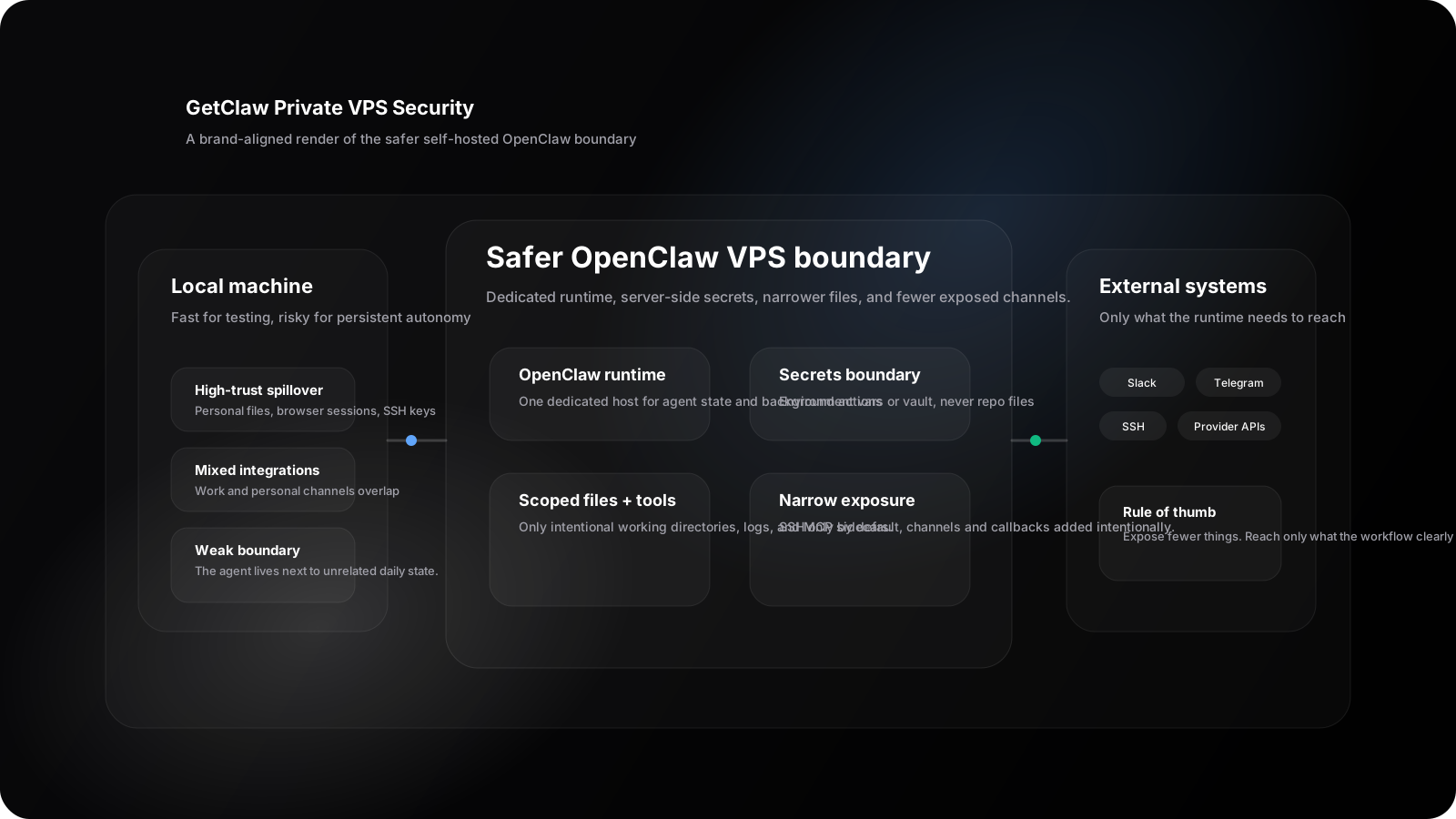
This brand-aligned security render makes the core decision visible: keep OpenClaw, its secrets, its files, and its routing policy inside a dedicated VPS boundary instead of mixing them into your daily machine.
Before you start: what you actually need
Before you try to run OpenClaw on a private VPS, make sure the host can support a boring, durable setup:
- a fresh Linux VPS or private VM you control
- one non-root admin user
- SSH key access
- enough disk for logs, uploaded files, and workspace state
- a firewall with a default-deny posture
- a place to store runtime secrets outside the repo
If you are still shopping for the host itself, compare this guide with Best Agent VPS for OpenClaw. If you already know you want a private environment without assembling the full stack, Managed OpenClaw Hosting is the more direct alternative.
Step 1: Start with a clean private server
Provision a fresh Linux VPS for OpenClaw only. Do not reuse the same machine that already hosts unrelated production apps, personal backups, or internal databases unless you are deliberately segmenting it.
Minimum baseline:
- Fresh Ubuntu or Debian host
- One non-root admin user
- SSH key auth only
- Firewall enabled
- Automatic security updates enabled
Example hardening commands:
adduser claw
usermod -aG sudo claw

mkdir -p /home/claw/.ssh
chmod 700 /home/claw/.ssh

ufw default deny incoming
ufw default allow outgoing
ufw allow OpenSSH
ufw enable
If you are using a managed private AI host like GetClaw, this baseline is simpler because the machine is already dedicated to your AI workloads and you do not have to share infrastructure with unknown tenants.
Step 2: Install OpenClaw in its own directory
Keep the runtime isolated in a dedicated path instead of dropping it into a general-purpose home directory full of unrelated files.
sudo mkdir -p /opt/openclaw
sudo chown claw:claw /opt/openclaw

cd /opt/openclaw
git clone https://github.com/openclaw/openclaw.git .
Autonomous agents tend to accumulate tools, logs, and memory files. Keeping all of that under one predictable tree makes audits and backups much less annoying.
Step 3: Keep API keys out of the repo
Do not commit API keys, bot tokens, webhook secrets, or session tokens into .env examples checked into git. Store them server-side and load them at runtime.
Example:
sudo mkdir -p /etc/openclaw
sudo chmod 700 /etc/openclaw

sudo tee /etc/openclaw/openclaw.env >/dev/null <<'EOF'
OPENAI_API_KEY=replace_me
ANTHROPIC_API_KEY=replace_me
SLACK_BOT_TOKEN=replace_me
TELEGRAM_BOT_TOKEN=replace_me
EOF

sudo chmod 600 /etc/openclaw/openclaw.env
sudo chown root:root /etc/openclaw/openclaw.env
This is the minimum acceptable pattern. A dedicated secrets manager is better if you already use one.
If you are still deciding between platform-managed keys, BYOK, or fully self-hosted models, public AI API vs BYOK vs self-hosted models is the right comparison page. It helps clarify which secrets you should actually expect this VPS to hold.
Step 4: Limit what the agent can touch
OpenClaw does not need your whole machine to be useful. Create explicit working directories for the jobs you want the agent to perform.
Example:
mkdir -p /opt/openclaw/workspace
mkdir -p /opt/openclaw/logs
mkdir -p /opt/openclaw/data
Then point the agent, skills, and MCP servers only at those paths. Do not mount:
- Your personal home directory
- Shared team drives unless required
- Production SSH keys
- Browser profile directories
- Password manager exports
The easiest way to make an agent safer is to make fewer things reachable.
Step 5: Connect only the channels you actually need
OpenClaw is appealing partly because it supports Slack, Telegram, WhatsApp, Discord, and other messaging surfaces. That still does not mean you should wire up every channel on day one.
A safer rollout looks like:
- Start with one internal channel, such as a private Slack bot
- Validate prompts, tool access, and logs
- Add a second channel only after the first is stable
- Keep customer-facing or external channels for later
This reduces the number of inbound surfaces through which an attacker, a curious coworker, or a malformed message can steer the agent into dangerous actions.
Step 6: Treat MCP servers and community skills as code execution boundaries
MCP is useful because it gives agents standardized access to tools and context. It is also where many teams accidentally widen the blast radius.
Before enabling an MCP server or third-party skill, check:
- What exact commands or APIs can it invoke?
- Does it have write access or only read access?
- Which credentials does it hold?
- Can it reach the public internet?
- Does it expose local files beyond the intended scope?
As of 2026, MCP security has become a mainstream concern because local tool bridges can turn small mistakes into full remote code execution or secret leakage paths. The safe default is to grant read-only access first and expand later only when a workflow clearly needs it.
For a deeper hardening model, continue with MCP security in 2026. That article goes further on read-only defaults, filesystem scoping, browser-tool risk, and prompt-injection boundaries.
Step 7: Put OpenClaw behind a process manager
Use a service manager so the agent restarts cleanly, logs predictably, and reads its environment from one place.
Example systemd unit:
[Unit]
Description=OpenClaw
After=network.target

[Service]
User=claw
WorkingDirectory=/opt/openclaw
EnvironmentFile=/etc/openclaw/openclaw.env
ExecStart=/usr/bin/npm run start
Restart=always
RestartSec=5

[Install]
WantedBy=multi-user.target
Then enable it:
sudo systemctl daemon-reload
sudo systemctl enable openclaw
sudo systemctl start openclaw
sudo systemctl status openclaw
This gives you a repeatable operational model instead of a terminal tab you hope never closes.
Step 8: Add a model gateway if you need multiple providers
If your OpenClaw setup uses more than one model provider, route them through a dedicated gateway instead of scattering secrets and provider-specific logic across multiple configs.
A gateway helps with:
- Key rotation
- Usage tracking
- Failover between providers
- Consistent request formats
- Cleaner audit boundaries
This is one reason private AI infrastructure is attractive: the agent runtime, gateway, logs, and controls can live inside one environment you manage.
A practical deployment checklist
Use this checklist before you treat the setup like a real long-running service.
- OpenClaw runs on a dedicated VPS or VM
- SSH is key-only and password login is disabled
- Firewall defaults to deny incoming traffic
- Secrets live outside the repo
- The agent has access only to specific working directories
- Only required chat channels are connected
- MCP servers start read-only where possible
- Logs are stored centrally and reviewed
- Model access is routed through one controlled path
- Backups exclude unnecessary secrets and personal data
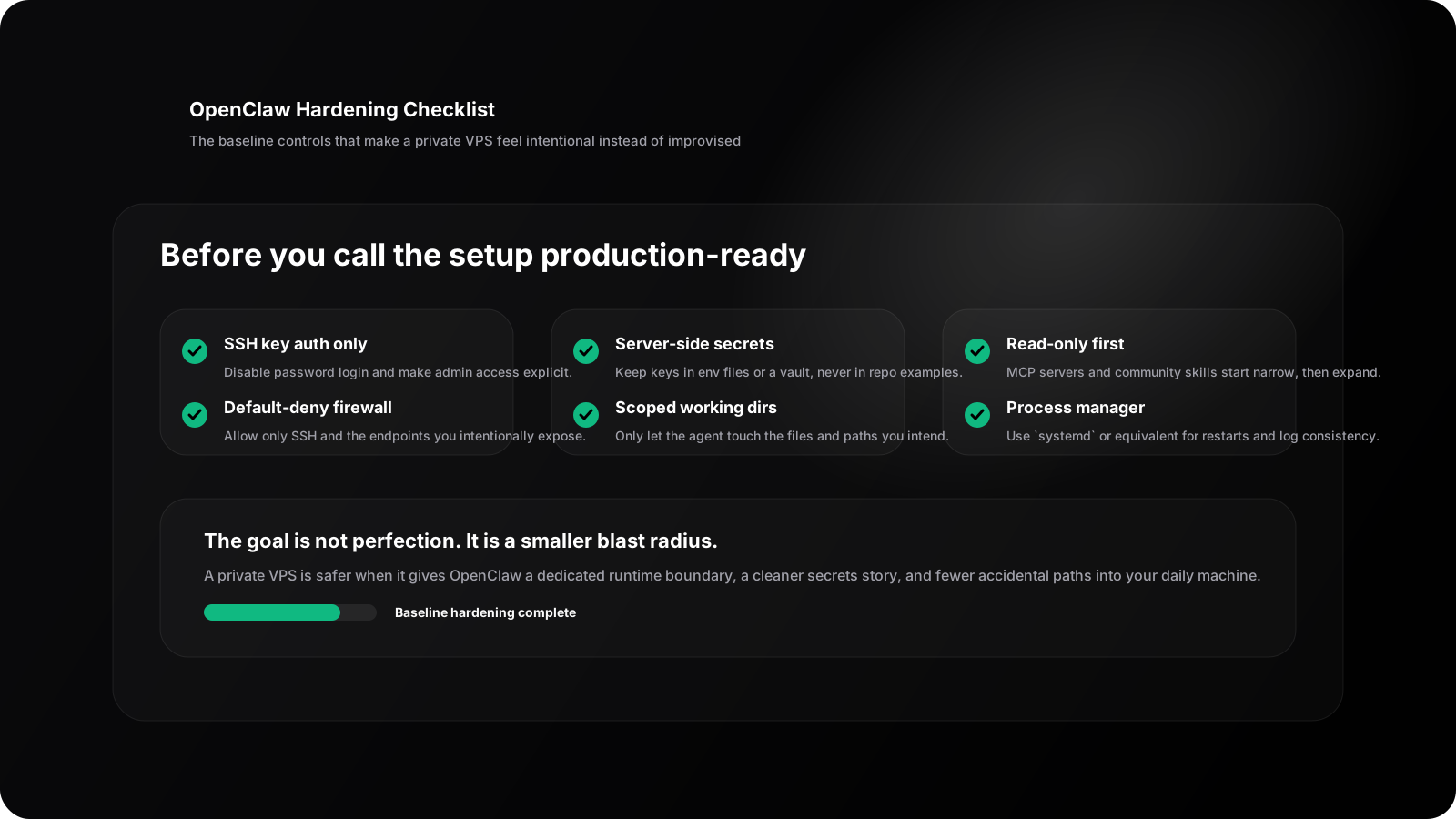
The checklist is deliberately boring. That is the point. The safest private VPS setup is usually the one with fewer surprises, fewer exposed surfaces, and a clearer operational boundary.
When should you use GetClaw instead of rolling your own server?
Use a fully managed private AI host when you want the isolation benefits of self-hosting without spending time on general infrastructure setup.
GetClaw fits best if you want:
- Dedicated AI infrastructure instead of shared hosting
- Full root access for OpenClaw, MCP servers, and local models
- A multi-model gateway in the same environment
- A cleaner security boundary than running an agent on a personal machine
If your goal is simply to test OpenClaw, a local install is faster. If your goal is to run an autonomous agent persistently, connect it to real channels, and keep the blast radius under control, private infrastructure is the stronger default.
If you want the shortest path instead of the most DIY control, compare Managed OpenClaw Hosting, pricing, and How to Deploy an AI Private Cloud in 3 Minutes. Those pages are the practical next step once the question shifts from "can I run it on a VPS?" to "what is the fastest safe production path?"
The bottom line
OpenClaw can do real work across tools, channels, and models. That is useful. It is also a good reason not to leave it on the same machine that holds your daily keys, files, and browser sessions.
The safer pattern is pretty plain: host the agent on a private VPS, keep secrets server-side, narrow filesystem access, limit integrations, and treat every MCP server or skill as a trust decision. You keep the upside of self-hosted autonomy without making your laptop the weakest link.
If you want a dedicated place to run OpenClaw with root access and private AI infrastructure already in place, start with Managed OpenClaw Hosting, compare the actual path in pricing, and pair it with the multi-model gateway.
If you are still shaping the broader deployment boundary first, read How to Deploy an AI Private Cloud in 3 Minutes before you commit to a raw VPS or managed plan.
If you want to test the workflow before choosing infrastructure, use the free private AI assistant tool. It previews Chatbox, BYOK, files, skills, Cron, and the hosted assistant boundary without asking you to register first.
FAQ
Is OpenClaw safer on a VPS than on a laptop?
Usually yes. A private VPS gives you a narrower blast radius, cleaner network controls, and fewer unrelated personal secrets than a daily-use laptop.
What kind of VPS do you need to run OpenClaw?
You usually want a private Linux server or VM with root or admin access, SSH key authentication, enough disk for logs and workspace files, and a firewall you can keep simple. The exact size matters less than the isolation and recovery model.
Can you run OpenClaw on a cheap VPS?
Yes, if the workload is light and you are using hosted model APIs instead of local inference. Cheap VPS plans break down when logs, channels, file workflows, or extra tools grow faster than the server boundary was designed for.
Should you self-host OpenClaw or use a managed environment?
Use self-hosting when control and private boundaries matter. Use a managed environment when convenience matters more than operating the stack yourself.
What is the biggest OpenClaw security mistake?
Running it on a machine that already contains your main SSH keys, browser sessions, personal files, and broad local tool access.
What should you secure first after the VPS is online?
Secure SSH, firewall rules, runtime secrets, scoped working directories, and MCP permissions before you add more channels or tools. Those basics matter more than cosmetic infrastructure tuning.
Sources and notes
- OpenClaw positions itself as a self-hosted gateway for AI agents across messaging channels and private workflows.
- The risk guidance in this article assumes 2026-style agent deployments where MCP servers, browser tools, and channel integrations can expand the blast radius if access is overbroad.
- Related reading: Meet OpenClaw, When a cheap OpenClaw VPS starts failing, free private AI assistant tool, MCP security, How to Deploy an AI Private Cloud in 3 Minutes, public AI API vs BYOK vs self-hosted models.
Ready to deploy your AI cloud?
Get your dedicated AI infrastructure up and running in 3 minutes. No complex setup required.
Not sure which path fits your deployment? Talk to us
Keep Reading
More posts from the same agent, infrastructure, and deployment cluster.
Best OpenClaw Hosting for Fintech Teams
Compare the best OpenClaw hosting options for fintech teams that need private model access, tighter key control, and cleaner audit boundaries.
OpenClaw Upgrade Guide: 2026.5.12 Stable vs 2026.5.16 Beta
A practical guide for choosing between OpenClaw 2026.5.12 stable and the 2026.5.16 beta releases, with test and rollback checklists for private deployments.
MCP Security in 2026: How to Deploy MCP Servers Without Creating an RCE Footgun
A practical guide to securing Model Context Protocol deployments in 2026, with least-privilege patterns, read-only defaults, network isolation, and safer ways to run MCP servers on private infrastructure.