
Multi-Model AI Gateway Guide: Routing, BYOK, Fallback, and Direct SDK Tradeoffs
Learn what a multi-model AI gateway does, when to use one instead of direct SDKs, and how routing, BYOK, and fallback fit private AI agent stacks.
What is a multi-model AI gateway?
A multi-model AI gateway is the control layer between an application or agent runtime and the model providers it uses. Instead of wiring OpenAI, Anthropic, Gemini, DeepSeek, local models, and future providers directly into every code path, the application sends requests to one internal endpoint. The gateway then handles model routing, BYOK, fallback, usage inspection, and provider-specific request details.
For OpenClaw and private AI agent stacks, the gateway matters because model choice is rarely isolated. It sits beside files, tools, channels, provider keys, logs, and operational policy. A good gateway keeps those decisions in one private layer instead of spreading them across app code and one-off scripts.
Quick answer
Use a multi-model AI gateway when your team needs one private control layer for model routing, provider fallback, BYOK handling, usage inspection, and keeping provider-specific logic out of app sprawl. Stay direct-to-provider when you truly have one provider, one narrow workflow, and no operational reason to centralize routing yet.
The gateway is not just an API convenience. It is an operating model for teams that expect model choice, key ownership, fallback, and private agent workflows to change over time.
Should you use a gateway or stay direct?
If you are evaluating gateway models, this is usually the real decision:
| If your situation looks like this... | Start with | Why |
|---|---|---|
| One provider, one narrow workflow, almost no routing policy | Direct provider SDKs | A gateway adds another layer before it earns its keep. |
| Multiple providers, BYOK, fallback rules, or local plus hosted models | Multi-model AI gateway | The routing and key logic belongs in one control layer instead of leaking through app code. |
| You want the runtime, gateway, files, terminal, and channels managed together | Managed OpenClaw hosting | The hosting layer absorbs more of the operational surface. |
Gateway vs direct SDKs vs managed hosting
| Decision | Direct provider SDKs | Private AI gateway | Managed OpenClaw hosting |
|---|---|---|---|
| Best fit | one provider, one app | multiple providers or local plus hosted models | teams that want hosting, gateway, files, terminal, and channels together |
| Routing logic | lives in app code | lives in gateway policy | lives in the hosted workspace/control surface |
| BYOK handling | repeated per app | centralized at the gateway | attached to the private workspace boundary |
| Fallback | rebuilt in each flow | centralized policy | paired with hosted runtime operations |
| Operational burden | low at first, spreads later | one layer to run and monitor | less DIY setup, less low-level freedom |
This table is the practical search intent behind multi-model AI gateway, AI gateway, model routing, and BYOK gateway: the buyer is deciding where provider complexity should live.
Why teams end up needing more than one model
Very few serious agent workflows stay single-provider forever.
Different tasks pull teams in different directions:
- one model may be better for code
- another may be stronger on long-context reasoning
- another may be cheaper for routine traffic
- another may be required for specific multimodal tasks or region constraints
- a local model may be useful for private reasoning or controlled staging
Without a gateway, those decisions leak into the application everywhere. You end up duplicating auth flows, model-specific request formatting, retry logic, rate-limit handling, cost tracking, and fallback behavior.
When a team should use an AI gateway
Use a gateway when at least two of these are true:
- you rely on more than one model provider
- you care about BYOK and key ownership
- you want fallback when a provider is degraded
- you want one place to log model usage
- you want the application to stay provider-agnostic
- you want to separate routing policy from app code
- you plan to combine hosted APIs with local models such as DeepSeek R1
If you only make a handful of calls to a single provider, a gateway may be premature. Once OpenClaw becomes a real runtime rather than a toy environment, it usually stops being premature.
When not to use a gateway
Do not add a gateway just because the architecture sounds cleaner. It is probably unnecessary when:
- one app calls one provider
- there is no fallback requirement
- BYOK is not part of the product or workflow
- usage reporting can stay inside the provider dashboard
- the team has no one to operate another service
- latency is more important than central policy
This matters for trust. A gateway adds a layer. It should earn that layer by reducing operational confusion somewhere else.
How model routing works
A gateway usually makes a routing decision from a small set of inputs:
- requested model or alias
- workload type
- user or workspace policy
- key ownership
- provider availability
- cost or latency preference
- fallback rules
For example, an agent workflow might route routine summarization to a cheaper model, code-heavy reasoning to a stronger hosted model, and private document reasoning to a local DeepSeek R1 endpoint. The application does not need to know every provider detail if the gateway exposes a stable internal API.
What teams usually get wrong
The common mistake is treating the gateway as if it only solves "which model should I call?" In practice, the bigger benefit is deciding where the routing policy, provider keys, logging rules, and fallback behavior should live.
Without that clarity, teams often end up with:
- provider-specific branching spread across multiple services
- ad hoc retries that nobody owns
- BYOK decisions hidden in app settings instead of a runtime policy layer
- no clean answer when a provider degrades and another one should take over
That is why a gateway becomes a control-layer decision, not just an API wrapper decision.
Request flow example
OpenClaw or app surface
         |
         v
   Private AI gateway
         |
   +-----+---------+----------+
   |               |          |
   v               v          v
 Hosted API     Local model   Fallback provider
That structure is valuable because the application no longer has to know every provider detail. It only needs to know how to talk to the gateway.
How GetClaw's deployment boundary works
GetClaw's model assumes the routing layer lives inside your hosted environment instead of floating across local scripts, browser sessions, and scattered environment files.
That gives you a few concrete benefits:
- the gateway runs server-side
- your OpenClaw runtime talks to one controlled layer
- BYOK can stay attached to a private workspace boundary
- routing, logs, and operational choices stay closer together
- files, terminal access, and channel-connected workflows live beside the routing policy
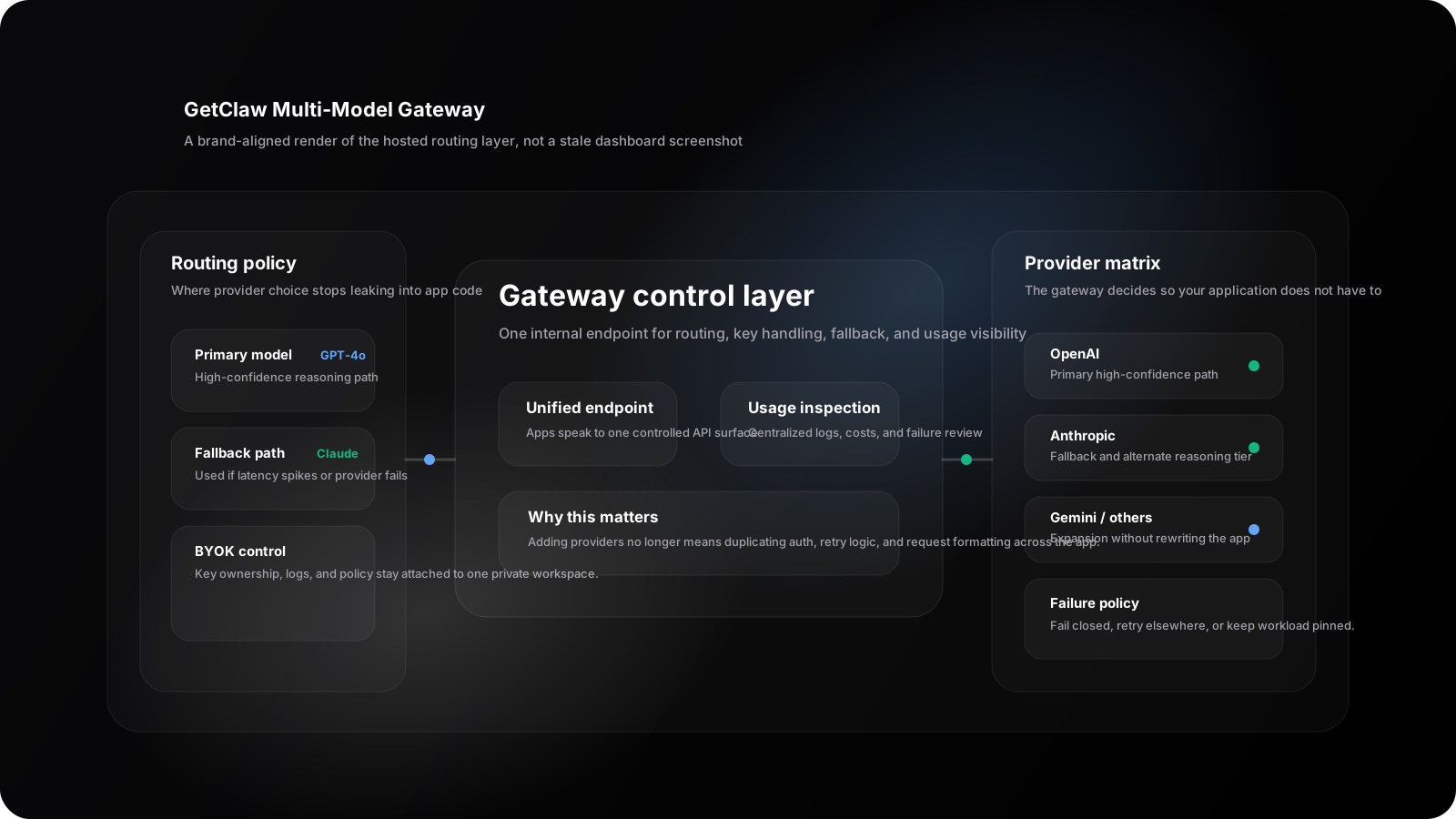
Illustrative gateway control-surface render aligned with the current GetClaw product language: routing policy, BYOK handling, and provider choice live in one hosted operational layer instead of scattered app code.
Latency and failure tradeoffs
A gateway is not there to make overhead disappear. It is there to make the overhead worth it.
You are adding a control layer, so there is always some extra network and routing work. The tradeoff is usually worth it when the team wants:
- fallback behavior
- centralized usage inspection
- BYOK separation
- provider abstraction
- local model plus hosted model routing
The useful question is whether the extra control saves more operational pain than the extra hop costs. For most always-on agent workloads, that answer turns into yes earlier than teams expect.
Failure handling is the other big reason to use one. A gateway can be the place where you decide which provider is primary, which provider is fallback, which workloads fail closed, and which workloads can be retried elsewhere.
When BYOK plus a gateway is worth it
BYOK plus a gateway starts to make sense when you want both cost control and operational clarity.
It is usually worth it when:
- you already have provider accounts
- you want direct ownership of the keys
- you want the hosted runtime but not opaque model billing
- you expect provider routing to evolve over time
- you need one policy surface for OpenClaw, internal apps, and local models
It is less worth the extra layer when:
- you only use one provider
- you do not need provider agility
- you do not care where routing policy lives
For many GetClaw buyers, this is the bridge between BYOK and Pro decisions: not just price, but how much routing and operational control they need.
Gateway checklist before production
Before you rely on a gateway for real OpenClaw or private AI agent work, check:
- every upstream provider has a named owner and documented key source
- model aliases are stable enough for app code to depend on
- fallback behavior is explicit, not accidental
- sensitive payload logging is limited by policy
- usage inspection is useful without leaking prompts broadly
- local model endpoints are private and authenticated
- failed providers have clear retry and fail-closed rules
- the gateway runs inside a private host boundary with a restart path
OpenClaw's gateway protocol docs are a useful reference point for thinking about a controlled gateway surface rather than provider-specific sprawl (OpenClaw gateway protocol).
How this changes the commercial decision
If your team wants one model, one app, and minimal infrastructure thinking, direct provider access may be enough.
If your team wants:
- OpenClaw online all the time
- multiple providers
- BYOK flexibility
- clean routing policy
- private model experiments such as DeepSeek R1 local deployment
- a private server-side runtime
then the conversation shifts toward managed OpenClaw hosting, How to Deploy an AI Private Cloud in 3 Minutes, and pricing, because the operational surface starts to matter more than raw setup freedom.
If you are still deciding on the host boundary first, read Best VPS for OpenClaw and OpenClaw VPS hosting.
Preview gateway tradeoffs in a free assistant workflow
A gateway discussion is easier when the visitor can see the workflow shape. The free private AI assistant tool gives a safe preview of BYOK, Chatbox, files, skills, Cron, and the hosted-runtime choices that sit around model routing.
Use it when the question is not just "which provider should we call?" but "where should the agent, files, keys, and scheduled work live?"
If you are earlier in the decision, start with what OpenClaw is, then see how to deploy OpenClaw and follow the setup tutorial.
FAQ
What is a multi-model AI gateway?
A multi-model AI gateway is one internal control layer that routes requests across hosted providers, local models, fallback paths, and BYOK policies without putting every provider detail into application code.
Why use a gateway instead of calling providers directly?
Use a gateway when routing, fallback, key ownership, usage inspection, or multi-provider support would otherwise be repeated across multiple apps or agent workflows.
Is an AI gateway only about cost?
No. Cost is one reason. The bigger reasons are control, routing clarity, key ownership, fallback, and operational simplicity.
Does a gateway replace secure hosting?
No. It complements secure hosting. You still need a private runtime boundary, scoped secrets, sensible logging, and a clear restart path.
Can a gateway route to local models?
Yes. A gateway can route to local models such as DeepSeek R1 as long as the endpoint is private, authenticated, monitored, and paired with fallback rules when quality or availability is not enough.
Sources and notes
- OpenClaw gateway protocol
- Anthropic API overview
- Google Gemini API docs
- vLLM OpenAI-compatible server documentation
- Related reading: Best VPS for OpenClaw and Autonomous Agents, free private AI assistant tool, Deploying DeepSeek R1 Locally, How to Run OpenClaw on a Private VPS, and Managed OpenClaw Hosting.
Route models privately without rebuilding your app around every provider.
If the gateway tradeoff makes sense now, compare the hosted path and the plan structure that gives you the clearest BYOK and routing options.
Not sure which path fits your deployment? Talk to us
Keep Reading
More posts from the same agent, infrastructure, and deployment cluster.
Hosted AI Agent Workspace vs Self-Hosted AI Agent Workspace
Compare a hosted AI agent workspace with a self-hosted AI agent workspace across control, security, file access, and operational overhead.
What Is MCP (Model Context Protocol)? A Practical Guide
Learn what MCP is, why teams use it to standardize tool access for AI systems, and how it fits into private agent infrastructure.
When a Cheap OpenClaw VPS Starts Failing: Install, Pairing, and 2am Restarts
A field guide for operators already running OpenClaw on a cheap VPS: what install and Telegram pairing failures actually mean, and when https://www.getclaw.me is the shorter path.