
How to choose the right VPS
Compare weak-host risk, root access, firewall control, and future expansion before you default to the cheapest cloud instance.
Read the VPS guideThe right OpenClaw hosting path depends on how much infrastructure work you want to keep. GetClaw is the faster default for teams that want a private hosted Gateway with BYOK, terminal access, channels, and a cleaner operational boundary than a laptop install or a bare VPS.
Use self-hosting when your team wants to own every package, firewall rule, and restart path.
Use a generic VPS when you already have an ops habit and only need raw compute plus root access.
Use GetClaw when you want OpenClaw online quickly with a private hosted boundary, BYOK, files, terminal access, and routing-ready infrastructure.
Visitors comparing self-hosted, VPS, and managed OpenClaw can try the free assistant workflow first: Chatbox, BYOK, files, skills, Cron, and a safe hosted-runtime preview.
Open the free assistant tool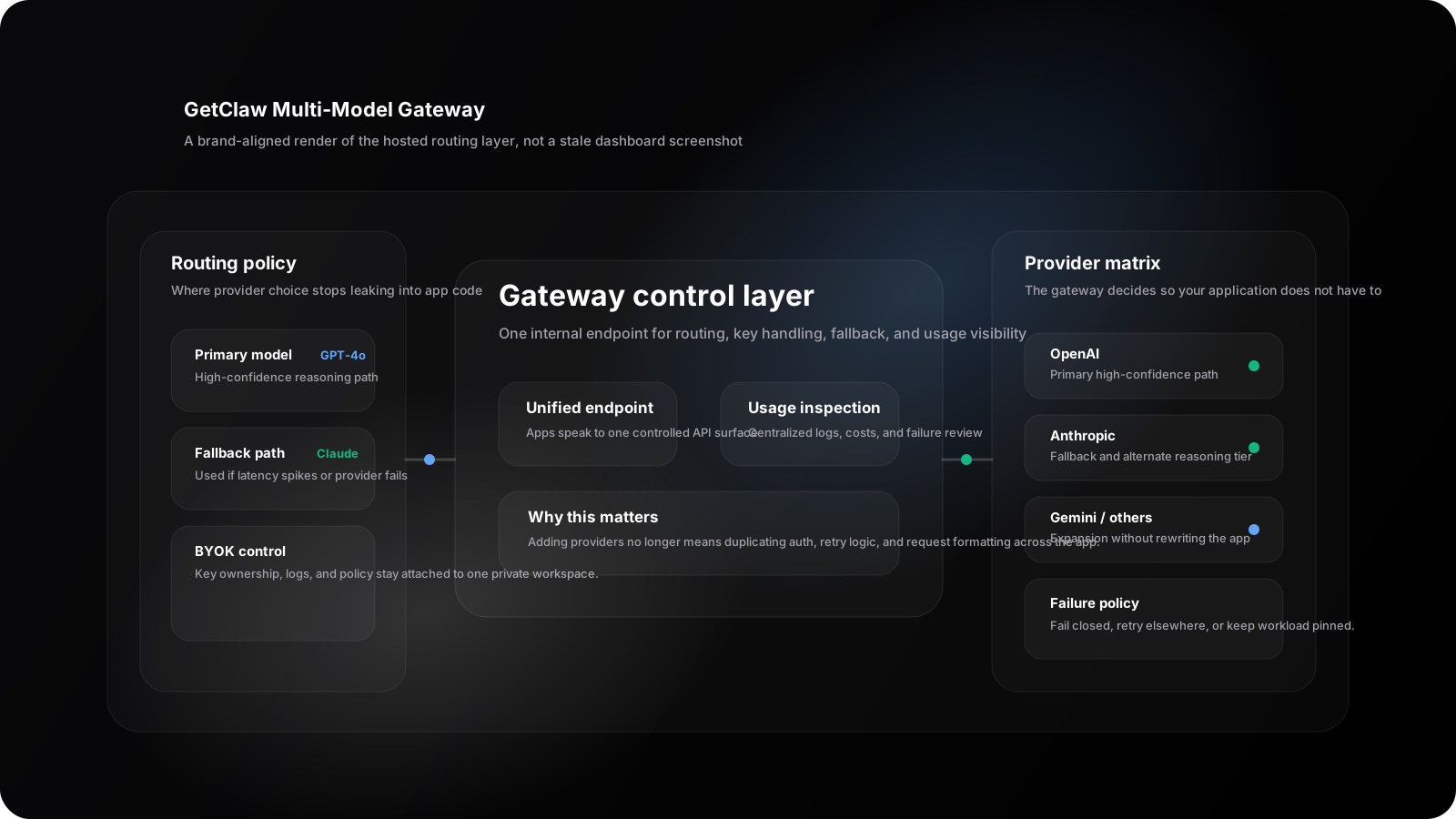
SVG proof layer aligned with the article visuals and OG cards: provider routing, BYOK handling, and private workspace controls all stay inside one hosted surface.
OpenClaw can run on your own machine or on a server. The right choice depends on whether you want maximum control or a faster path to production.
Best when you want to own every server decision. You run the Gateway process, connect channels, manage provider keys, configure remote access, patch packages, and handle uptime yourself.
A good middle ground if you already know your deployment stack. You still need to install OpenClaw, run onboarding, expose the Control UI safely, and wire up channels and credentials.
Best when you want an OpenClaw-ready private workspace online quickly, with isolated hosting, BYOK, root terminal access, files, channels, and automation in one place.
GetClaw bundles the infrastructure pieces an OpenClaw Gateway needs into one private workspace.
Run the OpenClaw Gateway on hosted infrastructure instead of keeping it on your laptop, workstation, or a manually managed VPS.
Choose BYOK hosting with container-level isolation or dedicated VPS infrastructure with Pro, depending on how much control you need.
OpenClaw needs an API key from your chosen provider. GetClaw supports BYOK and also offers Pro plans with included monthly credits.
Keep the Gateway available for channel connections, per-sender sessions, routing, workspace isolation, and agent workflows.
OpenClaw is built around chat surfaces such as Telegram, Discord, Slack, WhatsApp, Signal, iMessage, and WebChat.
Use terminal access and workspace files to customize the hosted OpenClaw environment around your own agent workflow.
The official OpenClaw docs describe the Gateway as the source of truth for sessions, routing, and channel connections. GetClaw focuses on keeping that server-side environment online and manageable.
Initial OpenClaw environment available in minutes.
Canonical hosting path for private AI agent builders.
Internal links to pricing, deployment guides, and managed hosting detail.
Structured metadata and FAQ content designed for search discovery.
This page introduces the options. The three guides below are where we now do the deeper comparison, operational proof, and secure deployment framing that helps English organic visitors convert.
Compare weak-host risk, root access, firewall control, and future expansion before you default to the cheapest cloud instance.
Read the VPS guideSee the fast deployment guide when you want the bigger private cloud boundary before choosing a plan.
Read the deployment guideMap the hosting choice to model routing, failover, and BYOK ownership once one provider is no longer enough.
Read the gateway explainerOpenClaw hosting is the infrastructure layer for running the OpenClaw Gateway online. It can mean self-hosting on your own machine, running it on a VPS, or using managed hosting such as GetClaw.
Yes. GetClaw provides managed OpenClaw hosting so you can run a private AI agent without manually setting up the server, model routing, files, terminal access, and channel infrastructure yourself.
Yes. OpenClaw requires an API key from your chosen model provider, and GetClaw supports bring-your-own-key workflows for teams that want direct control over model usage.
BYOK hosting is a good fit for lower-cost hosting. Pro is better when you want a dedicated VPS, included monthly credits, and stronger isolation for a production OpenClaw Gateway.
Use these trust pages if you want to verify who owns the guidance and how to get help before choosing between self-hosted, VPS, or managed OpenClaw hosting.
See the specialist bylines behind GetClaw deployment, pricing, and infrastructure coverage.
Review how GetClaw documents hosting tradeoffs, updates flagship pages, and avoids unsupported claims.
Use support for product questions, billing help, account access, and deployment follow-up.
Compare BYOK hosting and Pro, then use the flagship guides if you still need to pressure-test managed versus self-hosted deployment.