
Deploying DeepSeek R1 Locally: Private Deployment Guide
Learn how to deploy DeepSeek R1 locally with Ollama, a private VPS, gateway routing, fallback, and production checks for private AI agent workflows.
What does deploying DeepSeek R1 locally mean?
Deploying DeepSeek R1 locally means running an open reasoning model on infrastructure you control instead of sending every reasoning task to a public model API. For teams handling proprietary code, internal documents, customer operations, or regulated workflows, the main value is a clearer boundary around prompts, outputs, model access, logs, and fallback policy.
DeepSeek R1 is a family of open reasoning models. The original DeepSeek R1 paper showed how reinforcement learning can produce strong reasoning behavior, and the ecosystem includes distilled variants that are easier to test on private machines (DeepSeek R1 paper). Local deployment is now realistic for more teams, but it is still only dependable when the model, gateway, auth, logs, and recovery path are designed together.
Quick answer
Deploy DeepSeek R1 locally when privacy, repeat workload economics, or model-control needs matter more than pure convenience. Use Ollama for the first local test, move to a private VPS or dedicated server when the workflow needs uptime, put a gateway in front of the model before teams or agents call it, and keep hosted frontier APIs available as fallback when quality or availability matters.
If you are just experimenting, run a smaller DeepSeek R1 variant locally with Ollama. If you are building an OpenClaw or private AI agent workflow, keep the model endpoint private, require gateway auth, log request metadata carefully, and document which tasks can fall back to hosted providers.
Quick setup path
| Step | Goal | What to check |
|---|---|---|
| 1. Ollama test | prove the model runs locally | model size fits RAM, prompt latency is acceptable |
| 2. Private VPS or server | move from demo to persistent runtime | SSH keys, firewall, disk, restart path, backups |
| 3. Gateway routing | avoid exposing the raw model server | auth, model naming, usage inspection, fallback policy |
| 4. Hosted fallback | keep quality and uptime options open | provider keys, routing rules, failover expectations |
This path keeps the tutorial practical: start small, then add operational controls only when the workload needs them.
When local DeepSeek R1 deployment makes sense
Local DeepSeek R1 deployment is strongest when at least one of these is true:
- prompts and outputs should stay inside infrastructure you control
- repeated reasoning workloads make per-token API spend hard to forecast
- you need to test open model behavior against private documents or code
- agents need a staging environment before touching live tools
- you want one gateway that can route between local models and hosted APIs
It is a weaker fit when you need the strongest frontier model quality at all times, when latency depends on hardware you do not have, or when no one on the team can safely operate the server.
Local DeepSeek R1 deployment options
| Path | Best for | Tradeoff |
|---|---|---|
| Laptop with Ollama | quick local testing | not reliable for always-on agents or shared team access |
| Private VPS with Ollama | smaller distilled models and internal demos | limited by CPU/RAM unless sized carefully |
| GPU server with vLLM | higher throughput and OpenAI-compatible serving | more operational work and hardware cost |
| GetClaw-hosted private workspace | agent workflows that need files, terminal, gateway routing, and BYOK in one place | less low-level freedom than full DIY hosting |
Do not choose the path only by model size. Choose it by the operational boundary you need. A local model endpoint without auth, logs, restart policy, or gateway control is still fragile.
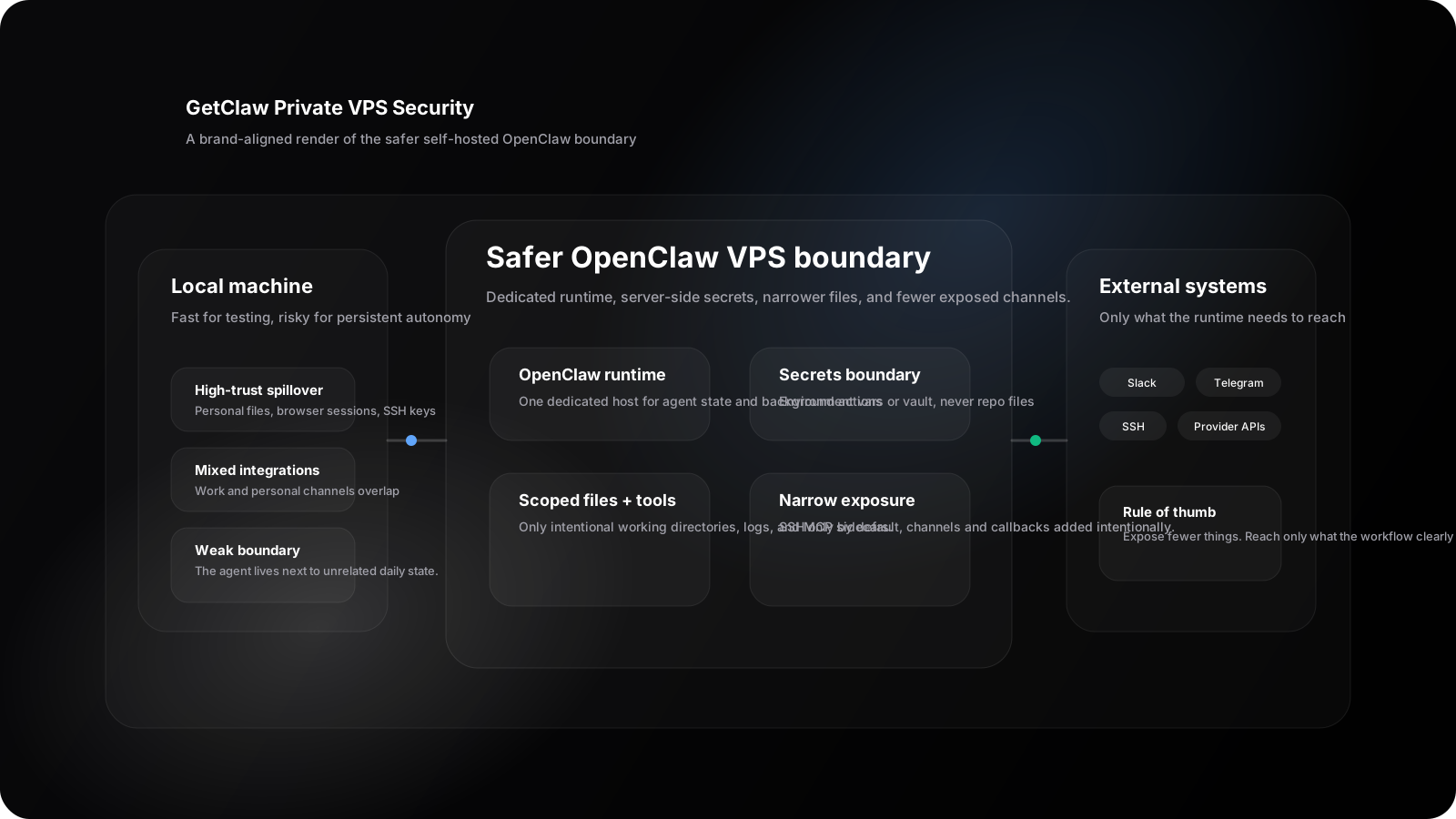
A private reasoning model is safer when model serving, gateway access, logs, and credentials live inside one bounded runtime instead of across a laptop, public callback URL, and scattered shell scripts.
Deploy DeepSeek R1 locally with Ollama
With SSH access to a private server, a simple first test looks like this:
# 1. Install Ollama on the server
curl -fsSL https://ollama.com/install.sh | sh
systemctl start ollama

# 2. Pull a DeepSeek R1 variant sized for the machine
ollama run deepseek-r1:14b
The Ollama DeepSeek R1 library lists available variants and is the right place to check model naming before you script the install (Ollama DeepSeek R1 library).
For a safer team setup, bind the model to localhost first and expose it only through an authenticated internal gateway. That way the model endpoint is not the public product surface.
When to use vLLM instead
Use vLLM when you need an OpenAI-compatible server, higher throughput, batching behavior, or a cleaner path toward production model serving. vLLM adds operational weight, but it becomes more appropriate once multiple internal applications or agent workflows need a stable API surface (vLLM OpenAI-compatible server documentation).
The production pattern is:
- run DeepSeek R1 or a distilled variant in the model-serving layer
- keep that layer private
- put gateway auth, routing, fallback, and usage inspection in front of it
- let OpenClaw or internal apps call the gateway, not the raw model server
Integrating DeepSeek R1 with an AI gateway
Running the model is only part of the job. You still need a safe way to expose it to OpenClaw, internal users, or application services.
A private gateway helps with:
- Routing: decide when to use local DeepSeek R1 versus hosted providers
- Auth: ensure only approved users and apps can call the model
- Fallback: send requests elsewhere when the local endpoint is overloaded or offline
- Usage tracking: log request metadata without broadly exposing sensitive payloads
- BYOK policy: keep provider keys attached to the workspace boundary instead of every app
{
  "routes": [
    {
      "model_name": "deepseek-reasoner-private",
      "upstream_url": "http://127.0.0.1:11434/v1/chat/completions",
      "require_auth": true
    }
  ]
}
This is where Understanding Multi-Model AI Gateways and How to Run OpenClaw on a Private VPS connect. Local inference is useful, but gateway policy and hosting boundaries decide whether it becomes dependable.
Production checklist before agents call the model
Before calling a local DeepSeek R1 setup production-ready, verify:
- the model server is not exposed directly to the public internet
- gateway auth is required for every caller
- provider keys and model credentials live in server-side secrets
- logs have retention rules and do not casually store sensitive prompts
- the server has a restart policy and recovery path
- model size is matched to real RAM, disk, and latency requirements
- OpenClaw tools, files, and MCP servers are scoped to the private workspace
- fallback exists for tasks where local model quality is not enough
- someone owns patching, monitoring, and failed restart recovery
OpenClaw's VPS guidance is useful here because it treats the server as a dedicated runtime with state, backups, and private access decisions, not just a place to run a command (OpenClaw VPS docs).
Best fit decision
| If your priority is... | Prefer... |
|---|---|
| private reasoning experiments | Ollama on a private machine |
| always-on OpenClaw agent workflows | OpenClaw VPS hosting or managed OpenClaw hosting |
| production serving with higher throughput | vLLM or a dedicated inference stack |
| maximum model quality and fallback | multi-model gateway with local plus hosted providers |
| lower setup burden | managed OpenClaw hosting |
The practical takeaway: DeepSeek R1 is useful locally when it is part of a controlled system, not when it is just another open port on a server.
How GetClaw fits without replacing the tutorial
GetClaw is relevant after the local model decision, not before it. If your team wants OpenClaw, files, terminal access, BYOK, and gateway routing in one private hosted workspace, managed OpenClaw hosting can reduce the infrastructure setup work. If your team wants full control over every package, process, and hardware decision, self-hosting on a private VPS remains the more direct path.
For pricing and plan fit, use GetClaw pricing. For the broader model-sourcing decision, read Public AI API vs BYOK vs self-hosted models.
FAQ
Can you deploy DeepSeek R1 locally?
Yes. You can run smaller DeepSeek R1 variants locally with tools such as Ollama, and you can move toward vLLM or a dedicated inference stack when higher throughput or an OpenAI-compatible API surface is required.
Can DeepSeek R1 run on a VPS?
Yes, especially smaller distilled variants. The real question is whether the VPS has enough memory, disk, private networking, restart policy, and gateway controls for the workload.
Should OpenClaw call DeepSeek R1 directly?
Usually no. Put a gateway between OpenClaw and the model endpoint so routing, auth, fallback, and usage policy stay centralized.
Is DeepSeek R1 always better self-hosted?
No. It is best self-hosted when privacy, workload economics, or model control matter more than pure convenience. Many teams still keep hosted models available for fallback and higher-quality general tasks.
What is the fastest safe first step?
Run a smaller DeepSeek R1 variant with Ollama on a private machine, keep the endpoint local, and only expose it through an authenticated gateway once the workflow needs shared access.
Sources and notes
Ready to deploy your AI cloud?
Get your dedicated AI infrastructure up and running in 3 minutes. No complex setup required.
Not sure which path fits your deployment? Talk to us
Keep Reading
More posts from the same agent, infrastructure, and deployment cluster.
How to Configure a Managed LLM Gateway on Hetzner
A practical guide to configuring a managed-style LLM gateway on Hetzner with provider routing, health checks, private networking, and clearer operating boundaries.
How to Host OpenClaw on Hetzner for Solo Builders
A practical solo-builder guide to running OpenClaw on Hetzner with the right server shape, safer admin access, and a simple path to keeping it online.
OpenClaw Slack setup guide for alerts and approvals
OpenClaw Slack setup guide for alerts, approvals, and safe operator handoffs, with practical scope, channel, and secret-management advice.