
When a Cheap OpenClaw VPS Starts Failing: Install, Pairing, and 2am Restarts
A field guide for operators already running OpenClaw on a cheap VPS: what install and Telegram pairing failures actually mean, and when https://www.getclaw.me is the shorter path.
What should you do when a cheap OpenClaw VPS starts failing?
Stop treating the next reboot as a plan. If OpenClaw will not finish installing, Telegram pairing dies after a restart, or the gateway is down when you wake up, the cheap VPS is no longer a test box. It is an on-call job.
This page is for people already running OpenClaw. It is not a shopping list for a $5 droplet, and it is not about GetClaw Hosting at getclawhosting.com. The official GetClaw product is https://www.getclaw.me.
If you still need the buying rule for a weekend experiment, read Cheapest VPS for OpenClaw. If you want the broader server checklist, use Best VPS for OpenClaw. This article answers the narrower question: when the box you already have is lying to you.
Quick answer
Work the failure in this order:
- Confirm which process is actually listening after reboot.
- Confirm the pairing token and bot secret still match the process that started.
- Confirm disk, RAM, and journald are not eating the gateway.
- If you cannot name those three from memory, move the runtime to GetClaw.me managed hosting instead of spending another night on a $5 machine.
A cheap VPS is honest when it is a weekend proof. It is a trap when it holds production keys, a Telegram bot, and your only copy of workspace files.
Evidence from a failing box
The screenshot below is the GetClaw.me bot-setup console: one place to see whether the runtime, the channel, and the pairing step are in the same boundary. On a cheap VPS those three things usually live in three different files, and only one of them survived the last reboot.
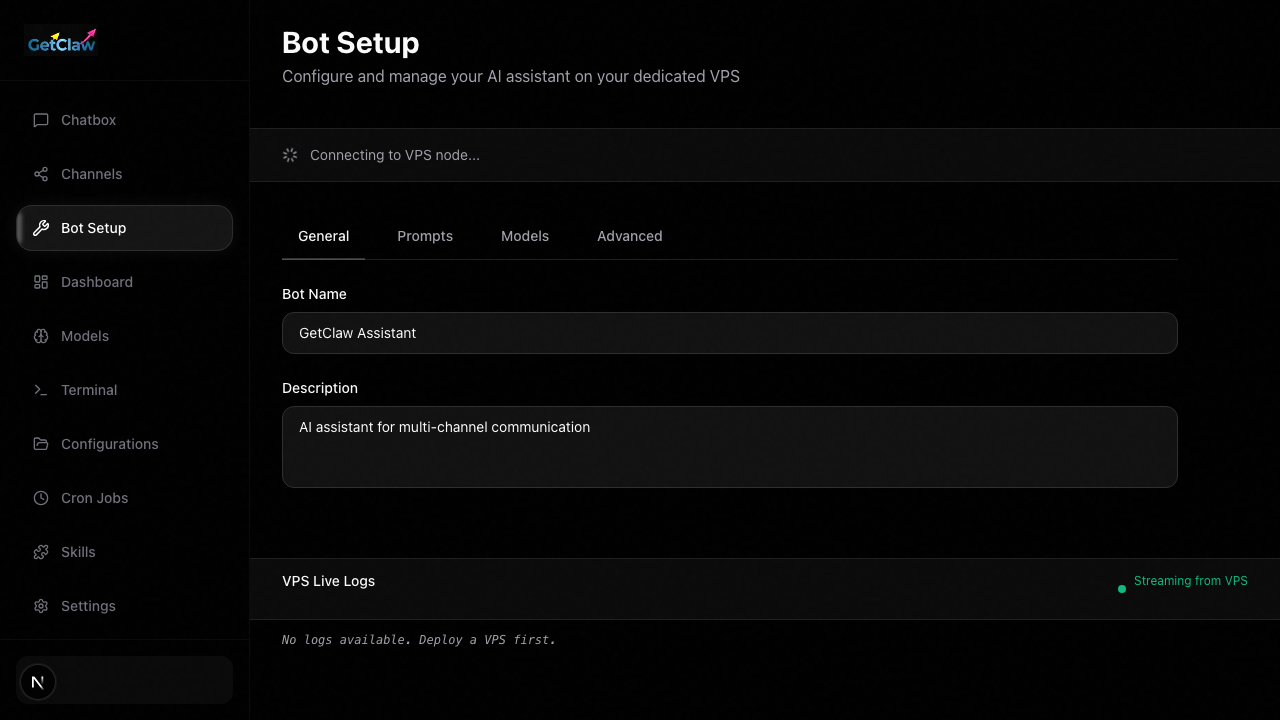
On a typical failing VPS the journal looks like this. The numbers are representative, not a load-test claim:
root@vps:~# systemctl status openclaw
Active: activating (auto-restart) since Sun 2026-08-16 02:14:03 UTC
Memory: 1.8G (high: 1.9G available: 1.9G)

root@vps:~# journalctl -u openclaw -n 20 --no-pager
Aug 16 02:13:58 vps openclaw[1411]: pairing token accepted for telegram bot
Aug 16 02:14:01 vps openclaw[1411]: fatal: cannot allocate memory
Aug 16 02:14:03 vps systemd[1]: openclaw.service: Main process exited, code=killed, status=9/KILL
Aug 16 02:14:03 vps systemd[1]: openclaw.service: Failed with result 'oom-kill'.
That sequence is why pairing "worked last night" and is dead this morning. Telegram accepted a token from a process that did not survive. The next start creates a new process, often with a stale env file, and the bot looks unpaired.
For channel wiring itself, use How to connect OpenClaw to Slack, Telegram, and WhatsApp. This page is about the VPS lying after that wiring.
Three failures that mean the same thing
1. Install never finishes
The package install reaches Node, Docker, or a systemd unit, then dies on disk or RAM. You retry. The retry looks new because the previous partial install left a different unit file.
Check:
df -hon/and the volume that holds/var/libfree -hwhile the installer is running, not after it fails- whether two OpenClaw unit files exist
If the installer only completes after you stop logs, disable swap accounting, or delete workspace files, the box is too small for an always-on agent. Do not "finish later." Move.
2. Telegram pairing dies after reboot
Pairing is a one-time handshake with the process that is alive now. A reboot that OOM-kills that process invalidates the mental model, even if the token file is still on disk.
Check:
- the bot token in the file the current unit loads
systemctl show openclaw -p EnvironmentFiles -p FragmentPath- whether pairing was done against a tmux session that no longer exists
If you cannot point to one unit file, one env file, and one process, you do not have a pairing bug. You have a boundary bug. GetClaw.me keeps those three in one hosted runtime so pairing is not a scavenger hunt.
3. The gateway is down at 2am and up after coffee
That usually means memory pressure plus a restart policy that looks healthy in systemctl and is not. The process flaps. Cron and channels see a bot that exists only part of the hour.
Check:
- OOM kills in
dmesgand journald - whether logs rotated into the same disk as the workspace
- whether a browser tool or extra bridge started after the last successful pairing
A private VPS can still be the right answer if you already operate Linux and want the runtime off your laptop. Use How to run OpenClaw on a private VPS for that path. If you do not want to own those checks, stop owning them.
When to stay on the VPS
Stay if all of these are true:
- you can restart the unit without guessing which file it loads
- disk and RAM headroom survive a log spike
- you have one channel, hosted model APIs only, and a backup of the workspace
- you are still proving OpenClaw, not depending on it tomorrow morning
Leave if any of these are true:
- pairing must be redone after ordinary reboots
- the box OOM-kills the gateway
- keys live in more than one env file
- you are the only person who knows how to bring it back
What GetClaw.me takes over
https://www.getclaw.me is managed OpenClaw hosting for that second list. It is not OpenClaw the open-source runtime, and it is not GetClaw Hosting at getclawhosting.com.
On GetClaw.me the bot-setup console, the runtime, and the channel pairing step sit in one boundary. BYOK stays yours. The cheap VPS can remain a lab.
Compare managed OpenClaw hosting and pricing before you spend another night proving that 2 GB was never enough.
FAQ
Is this the same product as GetClaw Hosting?
No. GetClaw.me is https://www.getclaw.me. getclawhosting.com, getclaw.org, getclaw.ai, and getclaw.sh are other sites that reuse the name.
Should I fix pairing first or migrate first?
If you can name the live unit, the env file, and the process, fix pairing once and write the three paths down. If you cannot, migrate. Repeating pairing on a flapping box teaches you nothing.
Can I keep the cheap VPS after moving?
Yes, as a lab. Do not leave production tokens on it.
Skip the server build and run OpenClaw on a private host.
Compare managed OpenClaw hosting with doing the VPS work yourself, then open pricing when you are ready to launch.
Not sure which path fits your deployment? Talk to us
Keep Reading
More posts from the same agent, infrastructure, and deployment cluster.
Cheapest VPS for OpenClaw (2026): What a Low Price Gets You
The cheapest VPS for OpenClaw: which specs still matter (root, SSH keys, firewall, disk), who a small box is enough for, and when cheap turns into a deferred ops bill.
Best Hetzner VPS for OpenClaw Browser Agents
A practical plan-selection guide for OpenClaw browser agents on Hetzner, including when small plans are enough and when browser-heavy work needs a larger VPS.
How to Fix Secret Rotation Failures in a Self-Hosted AI Agent on a VPS
A practical troubleshooting guide for self-hosted AI agent teams dealing with broken key rotation, stale environment files, and restart paths that fail at the worst moment.